
A hashtag is a clickable topic label. Put # immediately before a word or phrase, with no spaces, to help people find related posts. It does not change who is allowed to see your post.
“I thought it was a social media thing.” That was a common answer when I first asked people why they used hashtags. Fair enough. Facebook is hardly famous for explaining all its little extras.
Here are the basics for everyday Facebook use: why to, when to, how to, and whether you need to bother at all.
No. 2 in the series: 20 useful things to make you a Facebook super-user.
1What does a hashtag actually do?
In a Facebook post, a hashtag turns a topic or phrase into a clickable link. Someone can click it to explore related posts, or type it into Facebook’s search box.
My tomatoes have finally decided to cooperate. Only took them all summer! #GardeningTips
The hashtag labels the topic. The rest of the sentence still does the important job of saying something worth reading.
You can use hashtags in posts on a personal profile, a Page or in a group. They are useful labels, not a guarantee of an audience.
2Write it as one joined-up phrase
Use this
#GardeningTips
#LiverpoolWalks
#GardenIdeas2026
Avoid this
#Gardening Tips
The space breaks the phrase.
#Gardening-Tips
Punctuation breaks the tag.
Facebook’s Help says hashtags must be a single word with no spaces. Numbers can be included, but punctuation and special characters such as $ and % do not work.
For several words, start each one with a capital letter: #SilverJewelleryDesigner is easier to read than a long string of lower-case letters. Keep the phrase short enough that people can make sense of it.
You do not need to register a hashtag or join a hashtag group. Type it into the text of your post. You can invent a label for an event or project, but check it first: somebody else may already be using it for something entirely different.
3Search for a hashtag on Facebook
On a computer
- Click the Search Facebook box at the top.
- Type the hashtag, including the #. For example, #GardeningTips.
- Press Enter and explore the results.
- Use the filters Facebook offers if you need to narrow the results. The choices can vary.
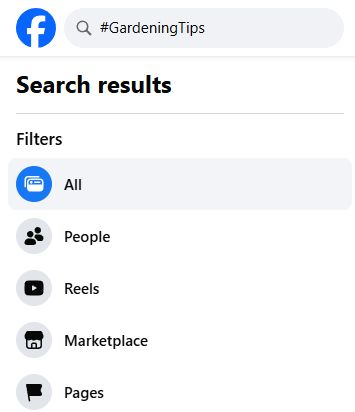
Tap or click the image to enlarge.
On a phone: tap Facebook’s search icon, enter the hashtag and run the search. You can also tap a hashtag in a post to explore that topic.
Facebook can open hashtag links as search results rather than the older standalone hashtag screen. Do not expect the layout, filters or a usage count to look exactly the same on every account.
You will not see every post on Facebook carrying that tag. Privacy settings still apply, and the results shown to you are not a complete public directory.
4Check who can see the post
Friends audience
A hashtag does not open the post to strangers. Friends who can already see the post can also encounter it through the hashtag.
Public audience
A public post can be visible beyond your friends and appear in the relevant hashtag results. That does not guarantee people will find it.
Before publishing, check the audience selector beneath your name. If the post belongs in a private circle, keep the appropriate audience. Do not switch it to Public just because you added a hashtag.
The same principle applies in groups: adding a hashtag does not bypass the group’s visibility rules. It labels the content; it does not grant access.
A hashtag is not a mention
#GardeningTips labels a topic. An @mention identifies a person, Page or group you select. Writing somebody’s name after a # is not the same as tagging or mentioning their account.
5Choose useful words, not a wall of tags
Start with what the post is actually about. #Gardening is broad; #ContainerGardening gives a clearer idea of the subject. A local or event-specific phrase can help when that is relevant.
Before using a tag
- Search it. Are the results about the subject you mean?
- Check the spelling. A typo creates a different label.
- Check the context. Avoid borrowing a popular tag that has nothing to do with your post.
- Keep the post readable. A hashtag should earn its place.
For an ordinary personal post, my practical suggestion is one or two relevant hashtags, if they help. That is a writing choice, not a Facebook rule or a magic formula for reach.
Meta has said it is reducing the distribution of accounts using spammy tactics, including long, distracting captions with excessive hashtags or captions unrelated to the content. That does not mean a third hashtag automatically gets you penalised. It means stuffing a post with irrelevant labels is a poor approach.
You can also use no hashtags at all. A family update does not need decorating with ten searchable labels to be worth sharing.
6A few things worth clearing up
Can I follow a hashtag?
Do not assume it works like following a person or Page. On the desktop account checked for this guide, the hashtag link opened search results. If you do not see a follow option, save the search address as a browser bookmark, or follow a relevant Page or person for regular updates.
Will hashtags get my post seen?
They can help label and discover content. They do not override privacy, guarantee a place in somebody’s Feed, or turn an uninteresting post into a popular one.
Should I copy Instagram’s hashtag list?
No. Write for the Facebook post and its audience. There is no need to copy a long list from another platform, and advice about other platforms is not automatically a Facebook rule.
Try it without posting anything
Search for one topic you enjoy, such as #GardeningTips. Compare it with a more specific phrase. It is a simple way to see whether hashtags are useful for the things you actually want to find.
For more control over what you read, see How to Control Your Facebook News Feed. For sharing choices, continue to How do I stop someone from seeing my posts on Facebook?
Sources and update notes
Updated 17 October 2026. Facebook’s hashtag and audience Help pages were checked, and desktop hashtag search and an existing hashtag link were inspected. The screenshot shows desktop; mobile app steps were not tested directly. Search layouts vary. The old informal survey and comparisons with other platforms are not presented as current research.
- How to use hashtags on Facebook
- Who can see posts using hashtags?
- Meta: action against spammy content and excessive hashtag tactics
Older comments below may refer to the previous version of this guide.
← Back to 20 useful things to make you a Facebook super-user
Digitally Done, giving you back a little bit of control!
Nice one! Thanks.
Good read. Thanks.
Good to know.