
You open Facebook to see what your friends are doing. Instead, you get adverts, strangers’ videos and yet another post from that one group. You only open the group because Facebook keeps putting it in front of you. Facebook may then take your attention as a reason to show you more.
Sound familiar? The quickest way to catch up with friends is to open Feeds and choose Friends. Making a custom friend list does not turn your normal Home feed into a complete friends-only feed.
This bonus answers the “why am I stuck seeing the same things?” question. For the full settings walkthrough, see How to Control Your Facebook News Feed.
1First, go where your friends’ posts are
On a computer
- Open Facebook and choose Feeds in the left menu. Click See more if it is hidden.
- Choose Friends within Feeds.
- Browse there when you want a catch-up, instead of returning to Home and hoping it has changed its mind.
Open the Friends filter in Facebook Feeds
That address was checked on desktop for this guide. Bookmark it in your browser if you want a quicker entrance next time. A bookmark is a shortcut, not a change to Facebook’s default Home feed.
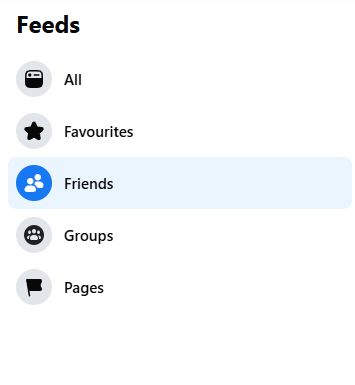
Tap or click the image to enlarge.
On a phone: open the Facebook app’s Menu → Feeds → Friends. Feeds may be under See more or available as a shortcut. Menu positions vary between Android, iPhone and app versions.
Meta describes Feeds as content from the sources you follow, in the order posted. Adverts can still appear. This is a more direct way to browse friends’ updates, not an advert blocker or a guarantee that every post will appear.
Why not just tap “Friends” on the main menu?
Facebook has more than one route with that name. Meta announced a redesigned Friends tab in March 2025, initially for the US and Canada, showing friends’ content without recommendations.
On the UK desktop account checked for this article, the separate Friends area still opens friend requests and People you may know. So if that is what you see, you have not done anything wrong. Go to Feeds → Friends instead.
2Why does that one group keep taking over?
Your Home feed is ranked. It is not simply a list of everything your friends have posted, newest first. Facebook predicts what will interest you using signals such as your interactions with posts, the kinds of content you engage with and how recently something was shared.
Here is the awkward part: Facebook can see what you engage with, but it does not automatically know why you engaged.
You might open a group post because it is the fifth one you have seen that morning. Or read an argument because it is so ridiculous you cannot quite look away. That attention can contribute to the system’s predictions. It is a plausible explanation for a repetitive feed, not proof of exactly how Facebook ranked your account.
Stop rewarding the loop out of irritation
If you do not want more of a group’s posts, opening them repeatedly to complain is unlikely to send a clear “less of this, please” signal.
Use the post’s three-dot menu instead. A joined group may offer Snooze for 30 days for a temporary break, or Unfollow for a longer one. Unfollowing a group lets you remain a member and visit it deliberately.
For a recommendation, use Not interested or the equivalent feedback shown on your screen. For detailed steps and ways to undo a change, use the main Feed controls guide.
3Are they all adverts? Check the label
When your feed is full of things you did not ask for, it can all feel like advertising. Facebook treats different items differently, though.
Sponsored
A paid advert. Use its ad menu and ad preferences. Those controls do not turn off ordinary recommendations.
Suggested content
A recommendation from a source you may not follow. Use Not interested or the feedback available.
A group you joined
Content from one of your connections. Use Snooze or Unfollow if it is taking over.
That distinction saves a lot of pointless button pressing. Adjusting adverts will not necessarily reduce the posts from a group you keep reading.
4Will Lists or Favourites solve it?
Custom friend lists organise people and sharing audiences. They do not force Facebook to display every listed person’s posts in Home. “Close friends” and “Favourites” are not interchangeable names either.
Favourites is the better tool for prioritising particular people. You can add up to 30 friends and Pages combined. Groups cannot be added. Favourite posts receive higher priority in your main Feed, and Feeds → Favourites lets you browse that selection directly.
For a personal catch-up, choose people rather than filling those places with business Pages. You do not have to use all 30. Start with the handful whose updates you keep missing.
See Facebook Lists for Newsfeed Preferences for the distinction between lists, Close friends and Favourites, or the Feed controls guide for the current steps.
5A new control announced this week
On 13 October 2026, Meta announced Your algorithm, a new area for adding and managing the topics you want in Feed and Reels. Meta says it is rolling out through the three-dot menu.
It also announced richer feedback after choosing Interested or Not interested, with possible follow-up questions where you can explain what you want more or less of in your own words.
If it appears on your account
Open a post’s three-dot menu and look for Your algorithm. Review the topics shown and adjust them to reflect what you actually want.
This is a rollout, so your account may not have it yet. The new control was documented in Meta’s announcement; it was not tested on the account used for this article.
It adjusts recommendations. Meta’s announcement does not promise a friends-only Home feed or removal of adverts. Feeds → Friends remains the more direct route when your aim is to see friends.
6My practical prescription: change the entrance
- Open Feeds → Friends for your catch-up. On a computer, bookmark the checked link above.
- Put a few important people in Favourites. Use its dedicated view when you want a smaller circle.
- Give the dominant group a break. Use Snooze or Unfollow rather than repeatedly opening it because it is there.
Then visit the people you miss directly if necessary. If you have unfollowed or snoozed someone before, check Content preferences for Reconnect or Snooze. Favourites and filters cannot override a post’s privacy settings or make somebody publish more often.
There is no guaranteed “reset Facebook to the good old days” button. But you can stop using its busiest shop window as the only entrance to your friends.
After all, you came to see how your friends are doing. You did not come to spend twenty minutes wondering why Facebook thinks you need another pair of orthopaedic sandals.
Sources and update notes
Checked on 18 October 2026. Live desktop checks confirmed Feeds and its Friends filter, the direct link above, and the separate Friends area showing requests and suggestions on the account used. The screenshot is a current desktop crop with personal details and posts excluded.
Android and iPhone instructions follow Meta’s documented Feeds route; the apps were not tested directly. Menu wording and feature availability vary by device, account and rollout. Your algorithm is included as an announced rollout, not a personally tested feature. No favourites, group subscriptions, feed preferences or privacy settings were changed during research.
← Back to 20 useful things to make you a Facebook super-user
Digitally Done, giving you back a little bit of control!